
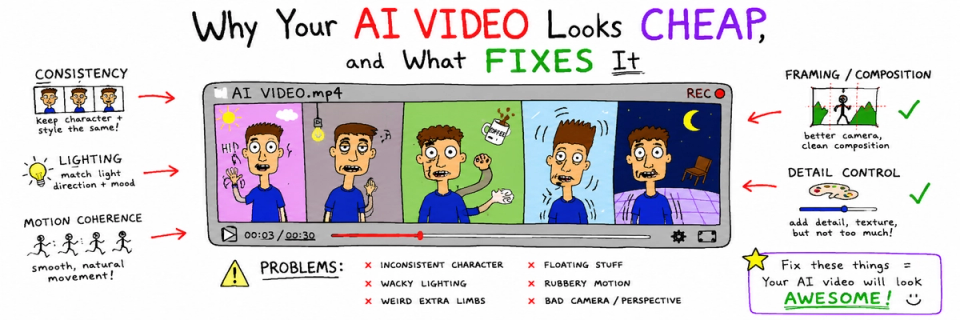
The most useful feedback we ever get on a generative piece is somebody saying they do not like it and being unable to say why. That gap is where the craft lives. An audience registers a violation of physical consistency long before it can name one, and the reaction arrives as a judgement about production value.
Nine failures account for almost all of it.
1. The light direction moves between shots
The most damaging and the most common. Shot one is lit from camera-left, shot three from camera-right, and the audience reads the sequence as two different places, or two different times, or a mistake.
Fix: write one key direction, as a clock position, before any generation. Hold it across the set. A shot that violates it is regenerated.
2. Everything is at the same distance
Generative output gravitates towards a comfortable medium shot. A sequence of nine medium shots has no rhythm, so it reads as a slideshow with motion.
Fix: shot-size discipline written into the edit before the render. Wide, medium, close, insert. Decide the pattern first and generate to it.
3. The eight-second motion tell
Most models hold coherent motion for a few seconds and then begin to negotiate with physics. Hair settles wrongly, a hand gains a finger during a gesture, fabric stops obeying gravity. Audiences do not see the drift; they see a clip that feels slightly wrong at the end.
Fix: cut before the model gets bored. Generate long, use the first stable segment, and build the piece out of short clips joined by real edits. One long generation is the trap.
4. Camera moves with no reason
A slow push-in on everything. Generative tooling makes camera movement free, and free movement gets used on shots that do not need it, so every shot arrives with the same lazy drift.
Fix: move the camera when the story moves. Otherwise lock it off. A locked frame among moving ones reads as confidence.
5. The face changes
Between shot two and shot seven the jawline narrows, the eye spacing shifts, the age moves by four years. This is the one audiences do consciously notice, and the moment they do, nothing else in the piece is believed.
Fix: a trained identity in place of a re-uploaded reference, plus a per-shot check against the identity sheet. A drifted face is a dead shot.
6. Text in frame
A sign, a label, a screen. Even in 2026 the failure rate on legible type is high, and a half-formed letter in the background is the single clearest tell available to a viewer.
Fix: compose text out of frame, or composite real type in post. Never leave the model to render a word the audience can read.
7. Grade applied per shot instead of per set
Each clip was made to look good on its own. Together they have nine slightly different blacks and eight different skin tones.
Fix: grade the sequence as one piece, from one reference frame, after the edit is locked. This is ordinary post-production discipline and it is skipped constantly on generative work because the clips arrive looking finished.
8. Sound treated as an afterthought
The fastest way to make a competent generative sequence feel cheap is a stock music bed and no room tone. Audiences forgive a great deal visually if the space sounds real, and forgive almost nothing if it does not.
Fix: room tone under everything, foley on the two or three actions the eye lands on, and music chosen after picture lock.
9. Too much happening
Because generation is cheap, sequences accumulate spectacle. Nine dramatic shots in thirty seconds has no shape, and the audience stops tracking anything.
Fix: one idea per shot, one point of interest per frame, and at least one deliberately quiet beat. Restraint is legible as budget in a way that spectacle is not.
The order to fix them in
If you can only address three: light direction, face consistency, and cutting before the motion tell. Those three account for most of the perceived quality gap. Grade and sound are next, and they are cheap. Everything else is refinement.
These nine as pass-or-fail checks, arranged by production stage so they get applied before the render. Free, no email gate.
DOWNLOAD THE CONSISTENCY CHECKLIST →